Yield
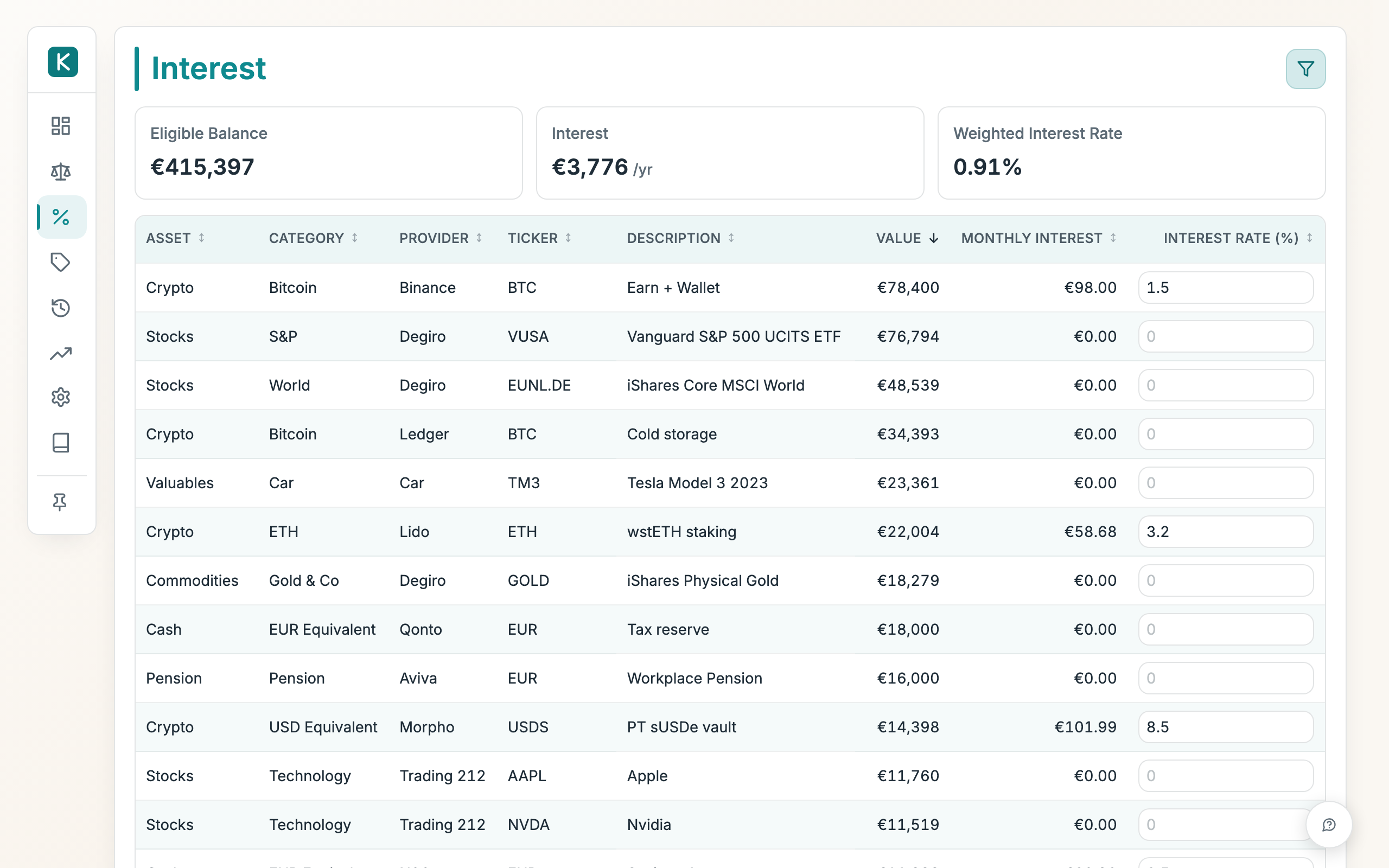
Track the yield on your interest-bearing holdings (savings, money-market, lending, staking) as well as what your liabilities cost. You type the annual rate for each line and this view shows what it earns (or costs) per month and the total across everything.
How to use
- Find the line you want in the table and type its annual rate into the Rate (% / yr) box. It saves as soon as you leave the box.
- Read the Gross column to see what that line earns per year before tax, and Net for what is left after tax. A negative figure is a cost. Click a yield card or figure to switch between annual and monthly.
- Check the cards up top: Total Value is the total value of the lines you're looking at, Gross yield and Net yield are their combined figures, and Weighted Yield is the average rate across the interest-bearing balance.
- Sort the table by Gross, Tax, Net or Rate (% / yr) to find your best and worst yielders.
- Use the filter bar (Portfolio, Class, Risk, Category, Provider, Ticker) to narrow the list; the cards update to match. Show all clears the filters; Reset restores your saved default view.
Positive and negative rates
The rate is signed, and its sign is its effect on your net worth:
- Positive rate, earns money. Use it for assets that pay you (savings, money market) and for a provision whose set-aside cash sits in an earning account.
- Negative rate, a cost. Use it for debt or a mortgage you service: enter the rate with a minus sign (e.g.
-4) and the monthly figure shows as a cost.
The yield is always computed on the size of the balance, so it works the same whether the line is an asset or a liability.
Tax and net yield
The tax on each line comes from its portfolio's settings in Settings → Tax, so there is nothing extra to fill in here.
- Interest or Gain. Pick how the line's yield is taxed in the Tax column. A savings account pays Interest, taxed at the portfolio's interest rate. A fund that reinvests its income grows in value instead, so pick Gain: it is taxed at the capital gains rate when you sell.
- Distribution tax. A company that pays its profit out to you is taxed twice: first the company rate, then a tax on the dividend. Set Distribution tax % in the portfolio's tax settings (a Belgian company under VVPR-bis: 15%). A 25% rate followed by 15% on the rest makes 36.25%.
- No tax settings yet. The line shows Set up tax and its net equals its gross until you configure that portfolio.
- Only income is taxed. A cost, such as a mortgage, stays as it is.
- The yearly capital gains exemption is not deducted here, so the net is a little cautious. The Tax tab has the exact figure.
Good to know
- To clear a rate, empty its box. The line then shows no yield.
- Every line with a value appears, assets and liabilities alike. Turn off Hide empty in the filter bar to include empty lines elsewhere.
- The rate is simple, not compounded. Monthly yield is the annual yield divided by twelve.